


7 Best OnlyFans Rippers to Rip OnlyFans Videos in 2026 [Free & Safe]
If you’re a regular on OnlyFans, you know how frustrating it can be when you come across a video you want to keep but there’s no download option available. Whether it’s a creator’s exclusive content or a one-of-a-kind video you don’t want to miss, the inability to save it can feel like a real letdown. This is often because the platform employs security features like Digital Rights Management (DRM) to protect the content. If you’ve ever wondered how to bypass these security measures to safely download OnlyFans DRM video content, you’re not alone! But don’t worry—there are plenty of tools out there that can help you rip OnlyFans videos safely and for free, ensuring you can access your favorite content anytime, even without an internet connection.
In this guide, we’ve rounded up the 3 best OnlyFans rippers you can use in 2026 to easily save videos to your device. These rippers are both effective and secure, giving you peace of mind while letting you download and store content for offline enjoyment. Let’s dive into the options that work best for ripping OnlyFans videos, and how you can get started today!
We also do not endorse or encourage any violation of copyright laws. Always obtain permission from content creators before downloading their work, and never redistribute or share downloaded content. Use these tools responsibly and in compliance with applicable laws.
Best OnlyFans Ripper to Rip Premium OnlyFans Video
The best tool to rip OnlyFans videos available in this day and age is none other than YT Saver OnlyFans Downloader. With this ripper, you’ll be able to download OnlyFans videos as well online music, and playlists. You can also bulk backup all contents from your favorite creators in one click.
Except for Onlyfans, you can rip videos from 10,000+ sites, including YouTube, Instagram, TikTok, Fansly, Dailymotion, etc. and then convert them to MP4, MP3, WAV, AAC, MOV, and other formats you want.

- Support OnlyFans, Fansly, YouTube, Facebook, TikTok and more
- Download OnlyFans DRM Videos in 1080p HD
- Save Videos from OnlyFans Chat/Messages Easily
- Bulk Download Videos from Favorite OnlyFans Creators
- Comes with privacy mode to protect your downloaded Onlyfans contents
? How to Rip OnlyFans Video on PC/Mac?
Step 1 First of all, you need to download the YT Saver software as an OnlyFans ripper on your PC.
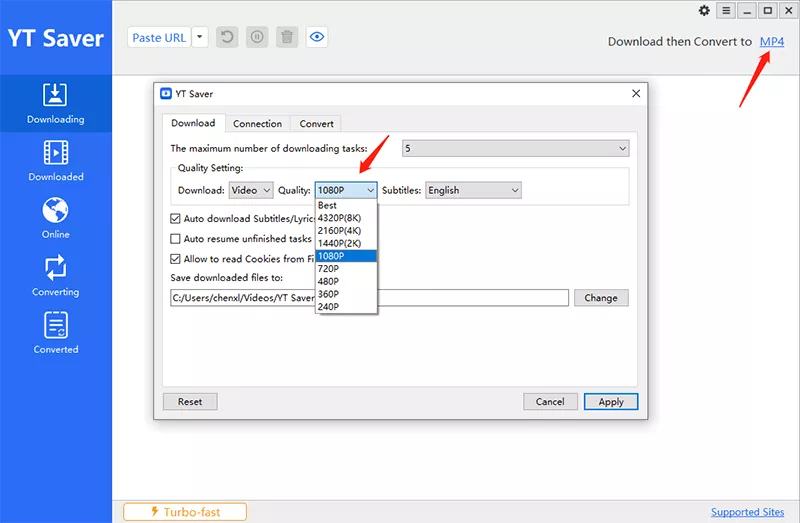
Step 2 In the next step, choose the output format and the quality of the video in the Downloading menu of “Preferences” tab.


Top 2 Ways to Rip OnlyFans Videos with Chrome Extension
There are a variety of ways in that you can save content from OnlyFans to play later offline. One of them is using the Chrome Downloader extensions for OnlyFans.
#1. Downloader for OnlyFans Pro
Downloader for OnlyFans Pro is a Chrome extension that allows you to save OnlyFans videos. After the OnlyFans extension is installed in the Chrome browser, the websites you visit, including OnlyFans, will include the “Download” button that you can click to begin the download process.
This extension is an efficient tool. It’s an easy way to download any image as an OnlyFans Picture Downloader too. The downside of this extension tool is that the downloading function can fail from time to time. You’ll have to keep an eye on an update of the software in this case. However, it’s not a hack; you’ll still have to sign in to your account for downloading the video.

? How-to Steps
Step 1: In the first step, open Chrome web store.
Step 2: Find “OnlyFans Downloader” in the Search Box. Click the Add to the Chrome button.
Step 3: Make sure to confirm the extension pressing Add.
Step 4: Once you add the extension, go to your OnlyFans account.
Step 5: Choose the video you want and click on the extension icon to download your OnlyFans video.
#2. Bulk OnlyFans Downloader
It’s a Chrome extension that is free for users to download videos and images. It is necessary to be a follower or subscriber to onlyfans creators prior to downloading the content. The chrome extension works exclusively for onlyfans.com.
You can download all the files from your OnlyFans account. This extension lets you scrape all posts from an account you own or are subscribed to. The download feature allows you to save media included in posts. It can save and archive all links to media (Images Videos, Images, and Audio) to a JSON file.

? How-to Steps
Step 1: Start by logging into your OnlyFans account in the browser.
Step 2: Visit Chrome web store for the download of plugin for no cost.
Step 3: Once the extension is installed and running, you should be able to see the icon for the plugin on the top bar.
Step 4: Locate the video from OnlyFans that you want to download and click on this icon to begin downloading the video.
Note:
A lot of users complained that the extensions stopped working in the middle, and they can’t start the download process after clicking “download” button.
Comparison Table: Which OnlyFans Ripper is the Best?
| Feature | YT Saver Video Downloader | Downloader for OnlyFans Pro | Bulk OnlyFans Downloader |
|---|---|---|---|
| Platform Support | Windows, Mac | Chrome Browser Only | Chrome Browser Only |
| Supported Sites | 10,000+ sites including OnlyFans | OnlyFans only | OnlyFans only |
| Video Quality | Up to 8K | Original Quality | Original Quality |
| Bulk Download | Yes | No | Yes |
| Output Formats | MP4, MP3, WAV, AAC, MOV | MP4 only | Original format + JSON |
| Privacy Mode | Yes | No | No |
| Download Speed | 10X faster | Standard | Standard |
| Reliability | 100% success rate | May fail occasionally | Reported issues |
To Conclude
Look, we get it. Browser extensions seem like the easiest route. They’re quick to install and don’t require downloading software. But here’s the reality: many users have run into frustrating issues with these plugins suddenly stopping mid-download or causing browser crashes. It’s disappointing when you’ve found the perfect content from a creator you discovered through OnlyFans search tools, only to have your download fail halfway through.
That’s why we honestly recommend YT Saver for OnlyFans video downloads. It’s not just about having more features. It’s about reliability. You won’t have to worry about downloads failing or your browser freezing up. Plus, having control over output formats and quality means you can save videos exactly how you want them, whether that’s for your phone, tablet, or computer. Sometimes investing a few minutes in proper software setup saves you hours of headaches down the road.

YT Saver Video Downloader
Download Video from YouTube, Instagram, TikTok, Onlyfans, etc.
- Provides a wide range of output formats, like MP4, MP3, MOV, AAC, etc.
- Download videos in HD resolutions, ranging from 720p to 8K
- Powerful Batch downloading without any limitations
- 10X faster downloads, with a 100% success rate
- Use a privacy mode to secure your downloaded content
- 4 Best Methods to Download Fansly Video on Android Devices
- [2026 Update] 4 Best Fansly Video Downloader for Android Users
- What is OnlyFans++ APK? It is Really Access Premium OnlyFans Contents for Free? Here is The Answer!
- Streamfork Review: It Is Worth to Purchase? and Best Alternative
- [2026 Update] 4 Best OnlyFans Video Downloader for Android Phones

